
Upload Agentic Data
Understand how Deepchecks models agentic hierarchical data - spans, traces, parent/child relationships - and how to upload it from a custom agent framework.
If you are building with a supported framework (LangGraph, CrewAI, Google ADK, LangChain), use Auto-Instrumentation instead - it captures the span hierarchy automatically.
This page is for teams who have built their own agent orchestration (a custom framework, a homegrown pipeline, or a framework Deepchecks does not yet support) and need to define and upload the span hierarchy manually. Before any code, it's important to understand what Deepchecks expects agentic data to look like - because the structure you send directly shapes what Deepchecks can evaluate.
How Deepchecks models agentic data
Agentic systems produce hierarchical execution data: one step invokes others, those steps invoke more, and the full flow forms a tree. Deepchecks captures that tree as a set of spans linked together by parent/child relationships.
Spans, traces, and sessions
- A span is a single unit of work: an LLM call, a tool call, a retrieval step, an agent's reasoning loop, or an end-to-end chain. Every span has a clear input (what went in) and output (what came out), along with a
span_kindthat describes what the span represents. - A trace is a full execution - every span that happened as part of one run of your pipeline. A trace is defined by a unique
trace_id, and all spans that share that ID belong to the same trace. - A session is a grouping of one or more traces that belong together (for example, multiple turns in the same user conversation, each turn triggering its own trace). Spans that share a
session_idare grouped together in the Sessions screen.
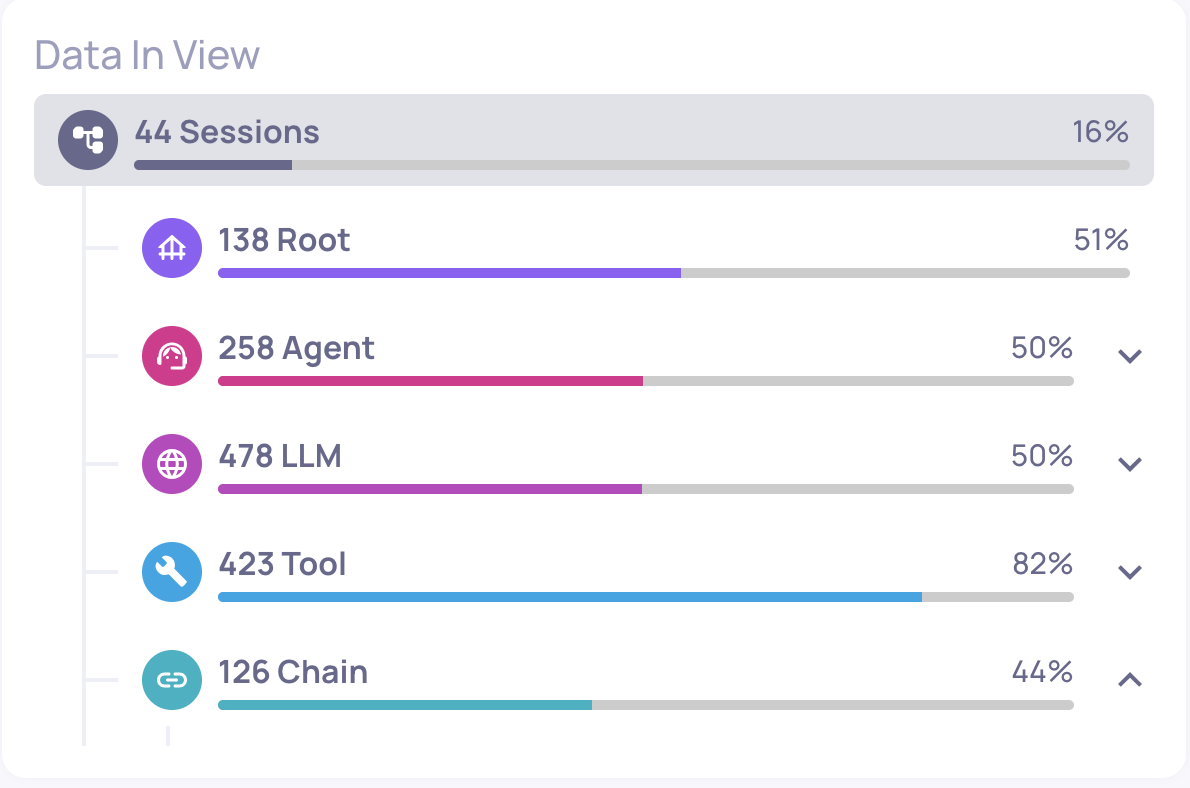
In Deepchecks, every span becomes an interaction - filterable, inspectable, and independently evaluated. The interaction types (Root, Agent, Chain, LLM, Tool, Retrieval) come from the span kinds you assign.
Parent/child relationships ("fathers and sons")
Every span except one declares a parent: the span that caused it. The one span with no parent is the Root. Together, parent/child links form a tree.
- A parent (or "father") is the span that invoked another. It represents a higher-level step that contains more granular steps inside it.
- A child (or "son") is a span that was invoked as part of its parent's work. A parent can have many children; children can themselves be parents of even deeper spans.
A span's input is what was passed into it when it was invoked; its output is what it produced after doing its work - potentially after its children finished executing. The output of a parent is typically a synthesis of what its children produced, not a raw concatenation: an Agent's output is the answer it returned, even though internally it may have made five LLM calls and three tool calls to get there.
The span kinds and what they represent
| Span kind | Interaction Type | Use for |
|---|---|---|
CHAIN (no parent) | Root | The top-level span - the full end-to-end execution. Every trace has exactly one. |
AGENT | Agent | An autonomous component that plans, makes decisions, and invokes tools/LLMs in a loop to accomplish a goal. |
CHAIN (with parent) | Chain | A deterministic multi-step sub-flow that is not the root (e.g., a pre-processing pipeline). |
LLM | LLM | A single call to a language model. |
TOOL | Tool | A function, API, database query, or action the agent invokes (e.g., web search, code execution, external API). |
RETRIEVAL | Retrieval | A retrieval step - embedding search, vector DB lookup, document retrieval for RAG. |
Best practice: what to group under an Agent
The Agent interaction type is the most important one to get right, because it represents the logical reasoning unit of your system. An Agent's typical pattern is a loop of "think, act, observe, repeat" until done:
- Call an LLM to decide the next action (think)
- Invoke one or more Tools based on the decision (act)
- Observe the tool results and feed them back to the LLM
- Repeat until the agent decides it is done
The best-practice structure in Deepchecks is to:
- Create an Agent span that represents the whole reasoning loop - its input is the task given to the agent, its output is the final result the agent produces.
- Nest the LLM calls and Tool calls (and any retrieval calls) as children of that Agent span, in the order they happened.
This way Deepchecks can evaluate the agent as a logical entity (did it accomplish its goal? was the plan efficient? did it abuse its tools?) and simultaneously evaluate every individual LLM and Tool call inside it. If you instead upload all those LLM and Tool calls as flat siblings with no enclosing Agent, you lose the ability to reason about the agent as a whole.
A concrete example
Consider a simple trip-planning assistant. A user asks for a weekend getaway plan; the system runs one planning agent (which uses an LLM + tools in a loop) and then a post-processing LLM to format the agent's output into a nice itinerary. Here is how this would be modeled in Deepchecks:
Root (Chain)
├── Agent (Planning Agent)
│   ├── LLM (Planning LLM call #1 - "what should I do next?")
│   ├── Tool (search_flights)
│   ├── LLM (Planning LLM call #2 - "now that I have flights, what next?")
│   ├── Tool (search_hotels)
│   └── LLM (Planning LLM call #3 - "I have everything, finalize plan")
└── LLM (Itinerary Formatter - turns the plan into readable text)
And the input / output of each span:
| Span | Input | Output |
|---|---|---|
| Root (Chain) | "Plan a weekend in Paris for 2 people, budget $2000" | "Here is your Paris weekend itinerary: Flights on Delta $... Hotel at Le Marais... Day 1: Louvre and Seine cruise..." |
| Agent (Planning Agent) | "Plan a weekend in Paris for 2 people, budget $2000" | {"flights": {...}, "hotel": {...}, "activities": [...]} (structured plan) |
| LLM #1 (Planning) | "Task: plan weekend. Tools available: search_flights, search_hotels. What should I do first?" | {"action": "search_flights", "args": {"from": "JFK", "to": "CDG", "dates": "..."}} |
| Tool (search_flights) | {"from": "JFK", "to": "CDG", "dates": "..."} | [{"carrier": "Delta", "price": 650, ...}, ...] |
| LLM #2 (Planning) | "Flights found: [...]. What next?" | {"action": "search_hotels", "args": {"city": "Paris", "dates": "..."}} |
| Tool (search_hotels) | {"city": "Paris", "dates": "..."} | [{"name": "Hotel Le Marais", "price": 180/night, ...}, ...] |
| LLM #3 (Planning) | "Hotels found: [...]. Budget so far: $... Done?" | {"action": "finalize", "plan": {...}} |
| LLM (Itinerary Formatter) | {"flights": {...}, "hotel": {...}, "activities": [...]} (structured plan from the Agent) | "Here is your Paris weekend itinerary: ..." (the final readable text) |
A few things to notice in this example:
- The Root's input and output are the user's question and the final answer. Everything in between is internal detail.
- The Agent's input is the task it was given; its output is its final structured result - not the intermediate LLM/Tool outputs. The LLM and Tool children are how the Agent did its work.
- Each LLM call inside the Agent has its own meaningful input and output - the planning prompt and the decision it produced. Deepchecks can evaluate each one individually (e.g., was the LLM's reasoning coherent? did it pick the right tool?).
- The Itinerary Formatter LLM is a sibling of the Agent, not nested inside it, because it runs after the agent finishes - it's a separate step in the Root chain, not part of the agent's internal loop.
- The Tool calls live under the Agent because they were invoked by the agent as part of its reasoning. If one tool call happened outside any agent (say, a direct tool call from the Root), it would be a child of the Root instead.
Once uploaded this way, Deepchecks automatically evaluates:
- The Root on overall quality (did the final answer satisfy the user?)
- The Agent on agent-specific properties (Plan Efficiency, Tool Coverage, Tool Abuse, Instruction Following)
- Each LLM call on LLM-specific properties (Reasoning Integrity, Instruction Following)
- Each Tool call on Tool-specific properties (Tool Completeness)
How the model maps to the Deepchecks UI
When the data is uploaded:
- Every span appears as one row in the Interactions screen with its own interaction type (Root / Agent / LLM / Tool / Retrieval / Chain).
- In the Sessions screen, you see the full trace as a hierarchical tree, and clicking into a session opens the Session View with the full parent/child graph.
- Each interaction type has its own independent property set and auto-annotation pipeline - configured on the Interaction Types screen. So you can evaluate Agent spans on "Plan Efficiency ≥ 3" while evaluating Tool spans on "Tool Completeness ≥ 4" in the same application.
Ready to upload: the SDK
Now that the structure is clear, uploading is straightforward. You create a Span object for each node in the tree, link them with trace_id and parent_id, and send them all with log_spans.
Installation
pip install deepchecks-llm-clientExample: logging a hierarchical trace
This example shows the minimum you need to log the trip-planner trace described above (abbreviated to a Root, one Agent, and one Tool for clarity):
import time
from deepchecks_llm_client.client import DeepchecksLLMClient
from deepchecks_llm_client.data_types import EnvType, Span, SpanKind

client = DeepchecksLLMClient(api_token="your-api-key")

trace_id = "trace_001"
session_id = "session_alpha"
base_time = time.time()

# Root span - every trace must have exactly one, with parent_id=None
root_span = Span(
    span_id="span_1",
    span_name="trip_planner",
    trace_id=trace_id,
    span_kind=SpanKind.CHAIN,
    parent_id=None,
    started_at=base_time,
    finished_at=base_time + 12.0,
    input="Plan a weekend in Paris for 2 people, budget $2000",
    output="Here is your Paris weekend itinerary: ...",
    status_code="OK",
    session_id=session_id,
)

# Agent span - child of Root
agent_span = Span(
    span_id="span_2",
    span_name="planning_agent",
    trace_id=trace_id,
    span_kind=SpanKind.AGENT,
    parent_id="span_1",
    started_at=base_time + 0.1,
    finished_at=base_time + 10.0,
    input="Plan a weekend in Paris for 2 people, budget $2000",
    output='{"flights": {...}, "hotel": {...}, "activities": [...]}',
    status_code="OK",
    session_id=session_id,
)

# Tool span - child of Agent
tool_span = Span(
    span_id="span_3",
    span_name="search_flights",
    trace_id=trace_id,
    span_kind=SpanKind.TOOL,
    parent_id="span_2",
    started_at=base_time + 1.1,
    finished_at=base_time + 1.5,
    input='{"from": "JFK", "to": "CDG", "dates": "..."}',
    output='[{"carrier": "Delta", "price": 650, ...}, ...]',
    session_id=session_id,
)

# Upload all spans together
client.log_spans(
    app_name="My Agent App",
    version_name="v1",
    env_type=EnvType.EVAL,
    spans=[root_span, agent_span, tool_span],
)
The Span class
The Span dataclass represents a single node in your trace tree. You build the hierarchy by creating multiple Span objects and linking them via trace_id and parent_id.
Required fields
| Field | Type | Description |
|---|---|---|
span_id | str | Unique identifier for the span |
span_name | str | Descriptive name of the operation |
trace_id | str | Identifier grouping spans into a single trace |
span_kind | SpanKind | Type of span: CHAIN, AGENT, TOOL, LLM, RETRIEVAL |
parent_id | str or None | span_id of the parent span (None for Root span) |
started_at | float | Start timestamp |
finished_at | float | End timestamp |
input | str | Data passed into the operation. Required for property calculation. |
output | str | Data returned by the operation. Required for property calculation. |
full_prompt | str | The complete prompt sent to the LLM. Required for LLM spans - enables Instruction Following and Instruction Fulfillment properties. |
Root span requirement: Every trace must have exactly one Root span, defined as
span_kind=SpanKind.CHAINwithparent_id=None. Evaluations begin only once the Root span is ingested.
Optional fields
| Field | Type | Description |
|---|---|---|
expected_output | str | Expected result for evaluation |
information_retrieval | list | Retrieved documents or data |
input_tokens | int | Number of prompt tokens |
output_tokens | int | Number of completion tokens |
tokens | int | Total tokens (auto-calculated from input + output tokens if not provided) |
status_code | str | Execution status (e.g., OK, ERROR) |
status_description | str | Additional context about the status |
graph_parent_name | str | Logical parent span name (used for graph visualization) |
session_id | str | Groups related traces into a session. Auto-generated if not provided (defaults to the trace ID for single-trace sessions). |
metadata | dict | Custom key-value properties |
steps | list | Ordered list of Step objects representing intermediate steps within the span (see Steps below) |
Steps
A span can include an ordered list of steps - intermediate processing stages that happened during the span's execution. Each step is a name-value pair captured as a Step object.
Steps are useful when a span performs multiple internal stages that you want to track and inspect, but that don't warrant their own child spans. For example, an LLM call that first retrieves context, then formats a prompt, then generates a response could log each of those as a step.
from deepchecks_llm_client.data_types import Step

span = Span(
    span_id="span_1",
    span_name="process_query",
    trace_id="trace_001",
    span_kind=SpanKind.CHAIN,
    parent_id=None,
    started_at=base_time,
    finished_at=base_time + 5.0,
    input="What is the weather in Tel Aviv?",
    output="Currently 28°C and sunny in Tel Aviv.",
    steps=[
        Step(name="retrieval", value="Retrieved 3 weather documents from vector DB"),
        Step(name="processing", value="Extracted temperature and conditions from documents"),
        Step(name="generation", value="Generated natural language summary from extracted data"),
    ],
)
Once uploaded, steps appear as step_<name> columns when retrieving data with return_steps=True via get_data().
The log_spans function
client.log_spans(
    app_name="My Agent App",
    version_name="v1",
    env_type=EnvType.EVAL,
    spans=[...list of Span objects...],
)| Parameter | Description |
|---|---|
app_name | Name of your Deepchecks application |
version_name | Version identifier |
env_type | Environment type (EnvType.EVAL or EnvType.PROD) |
spans | List of Span objects representing the trace |
All spans in a trace should ideally be uploaded together, though this is not mandatory. Child spans uploaded before the Root will be stored until the Root arrives, at which point evaluation begins.
Attributes and fields: When you upload spans, any raw data in the
metadatadict is stored as span attributes. Deepchecks parses these attributes - extracting things like model name, token counts, and tool arguments - and maps them into the structured fields used for property calculation, filtering, and system metrics. This is the same parsing that happens automatically with Auto-Instrumentation. When uploading manually, you can also set fields likemodel,input_tokens, andoutput_tokensdirectly on theSpanobject for more reliable extraction.
Key considerations
Timestamps are critical. started_at and finished_at define both latency for observability and span ordering within the trace. Accurate timestamps ensure correct evaluation and visualization.
Tokens are optional but recommended. Token counts enable cost tracking and token-based evaluation metrics. If not provided, Deepchecks does not infer tokens.
Sessions group related traces. If your application handles multi-turn conversations, set the same session_id across all traces in the conversation. If a session contains only a single trace, the session ID defaults to the trace ID.
Group LLM+Tool loops under an Agent span. As discussed above, this is the single biggest modeling decision. Flat uploads where every LLM and Tool is a direct child of Root lose the agent-level evaluation signal.
Updated 3 months ago