
Create and Refine a Prompt Property
Step-by-step walkthrough: create a numerical prompt property, test it on real interactions, and iteratively improve it until it produces reliable scores.
Prompt properties are custom LLM-as-a-judge evaluators you define in natural language. They are interaction-level properties - each interaction gets its own score and reasoning. Getting them right is an iterative process: write a guideline, test it on real interactions, refine based on what you see. This walkthrough uses a "Helpfulness" property as a concrete example - the same process applies to any numerical property you want to build.
→ For a conceptual overview, see Prompt Properties.
Scenario
You're evaluating a customer support chatbot. You want a numerical property that scores how helpful each response is - from 1 (not helpful) to 5 (very helpful) - with consistent, actionable reasoning.
Step 1: Create the property
- Go to Properties in the sidebar and click Create Custom Property
- Choose Prompt Property
- Choose Numerical (scores 1-5)
- Name it Helpfulness
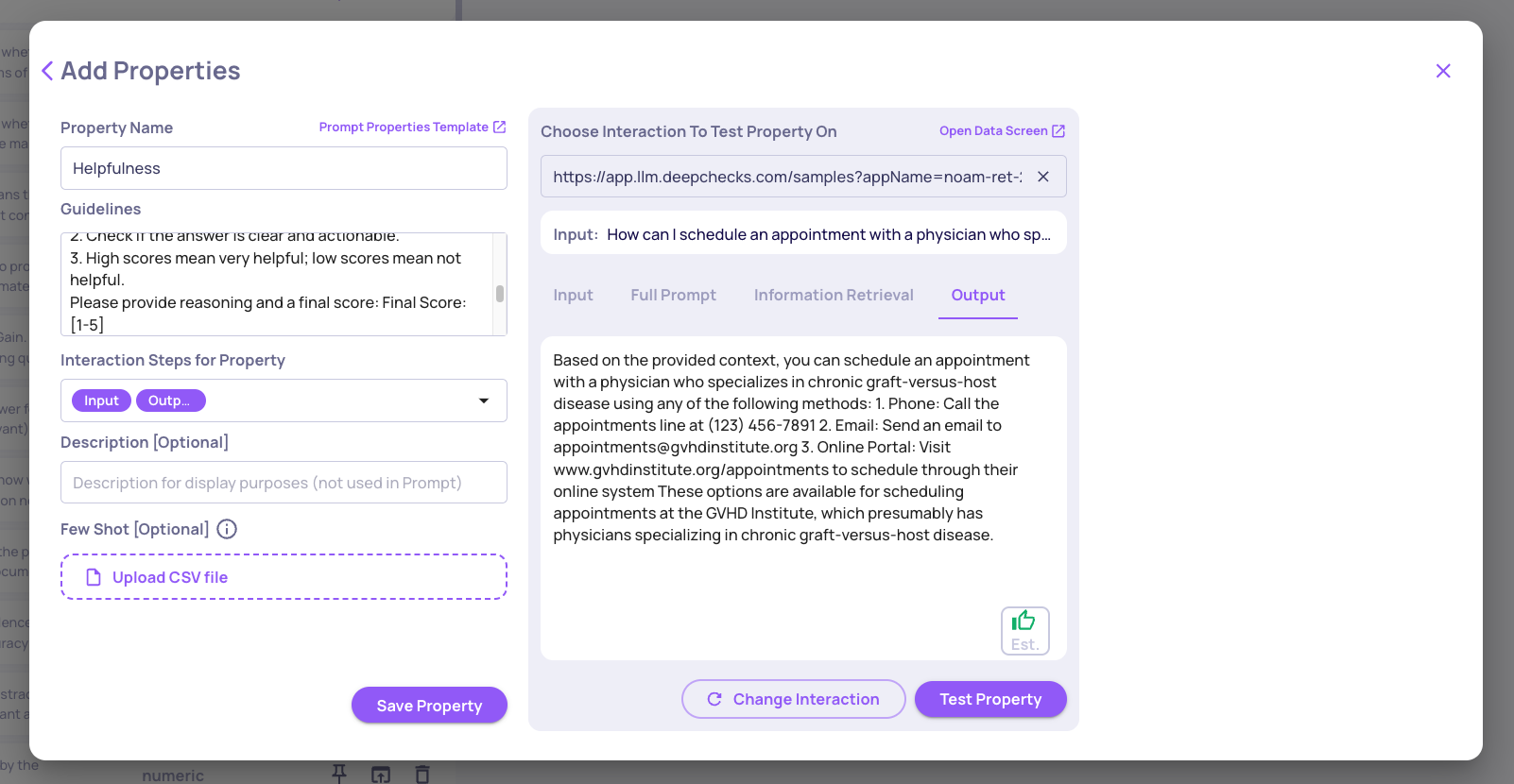
- Write your initial guidelines:
You are an evaluator. Rate the helpfulness of the provided answer to the user's question.

Guidelines:
1. Consider whether the answer addresses the user's question.
2. Check whether the answer is clear and actionable.
3. High scores = very helpful; low scores = not helpful.

Provide reasoning and a final score: Final Score: [1-5]- Set data fields to: Input (user question) and Output (LLM answer) - both as Must
Step 2: Use AI-assisted improvement
Before testing, use AI-assisted improvement to strengthen your initial guidelines. Deepchecks can suggest refinements based on patterns in similar evaluations - catching ambiguities and edge cases you may not have anticipated yet.
→ See Improve Guidelines with AI.
This is worth doing upfront because it often catches issues before you even run your first test.
Step 3: Test on real interactions
Use the built-in Test feature before saving. Select three representative interactions:
- One clearly helpful response
- One partially helpful response
- One unhelpful response
Review the scores and reasoning the model produces. Look for:
- Does it distinguish between the three levels?
- Is the reasoning specific, or vague (e.g., "the answer is okay")?
- Does it overrate partially helpful responses?
Step 4: Identify problems and refine
Common issues at this stage:
- Score inflation - the model gives 4 or 5 to mediocre responses
- Vague reasoning - "the answer addresses the question" with no detail
- Inconsistency - similar inputs get different scores
Fix by adding score anchors to your guidelines. Edit the property and make the scoring scale explicit:
Guidelines:
1. Score 5: Fully answers the question, clear, actionable, no missing info.
2. Score 3: Partially answers - some missing info or unclear steps.
3. Score 1: Does not answer, irrelevant, or confusing.
Re-test the same three interactions. The model should now:
- Score the partially helpful answer as 3 (not 4 or 5)
- Produce reasoning that references specific missing or present elements
If the results still don't match your judgment, keep iterating:
- If it still overrates → add more explicit examples of what constitutes a 3 in your domain
- If it underrates → clarify what counts as a 5
Step 5: Final validation and save
Test on a larger sample (10+ interactions) before saving. Confirm that:
- Scores are consistent across similar interactions
- Reasoning aligns with what a human reviewer would say
- Edge cases (avoided answers, very short responses) are handled as expected
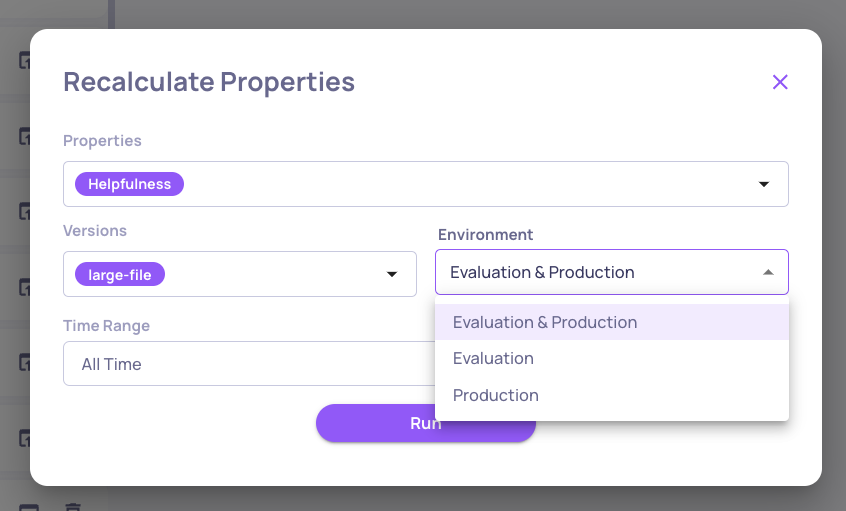
Once satisfied, save the property. Saving affects future calculations - all new interactions will be scored automatically. You also have the option to recalculate on past interactions, so you can apply the property retroactively to existing data.
Tips
- Start simple, then iterate. A vague guideline will produce vague scores. Use test results to identify exactly where it's going wrong.
- Anchor every score level. Ambiguity in your scale leads to inconsistency. Define what 1, 3, and 5 mean concretely.
- Test on real interactions, not ideal ones. Edge cases - one-word answers, off-topic responses, refusals - are where properties break most often.
Updated 3 months ago