Google ADK
Deepchecks integrates with Google ADK to provide tracing, evaluation, and observability for agents and their interactions across the Google ADK workflow.
Deepchecks integrates seamlessly with Google ADK, letting you capture and evaluate your Google ADK workflows. With our integration, you can collect traces from Google ADK interactions and automatically send them to Deepchecks for observability, evaluation, and monitoring.
How it works
Data upload and evaluation
Capture traces from your Google ADK interactions and send them to Deepchecks for evaluation.
Instrumentation
We use OTEL + OpenInference to automatically instrument Google ADK. This gives you rich traces, including LLM calls, tool invocations, and agent-level spans within the graph.
Registering with Deepchecks
Traces are uploaded through a simple register_dc_exporter call, where you provide your Deepchecks API key, application, version, and environment.
Viewing results
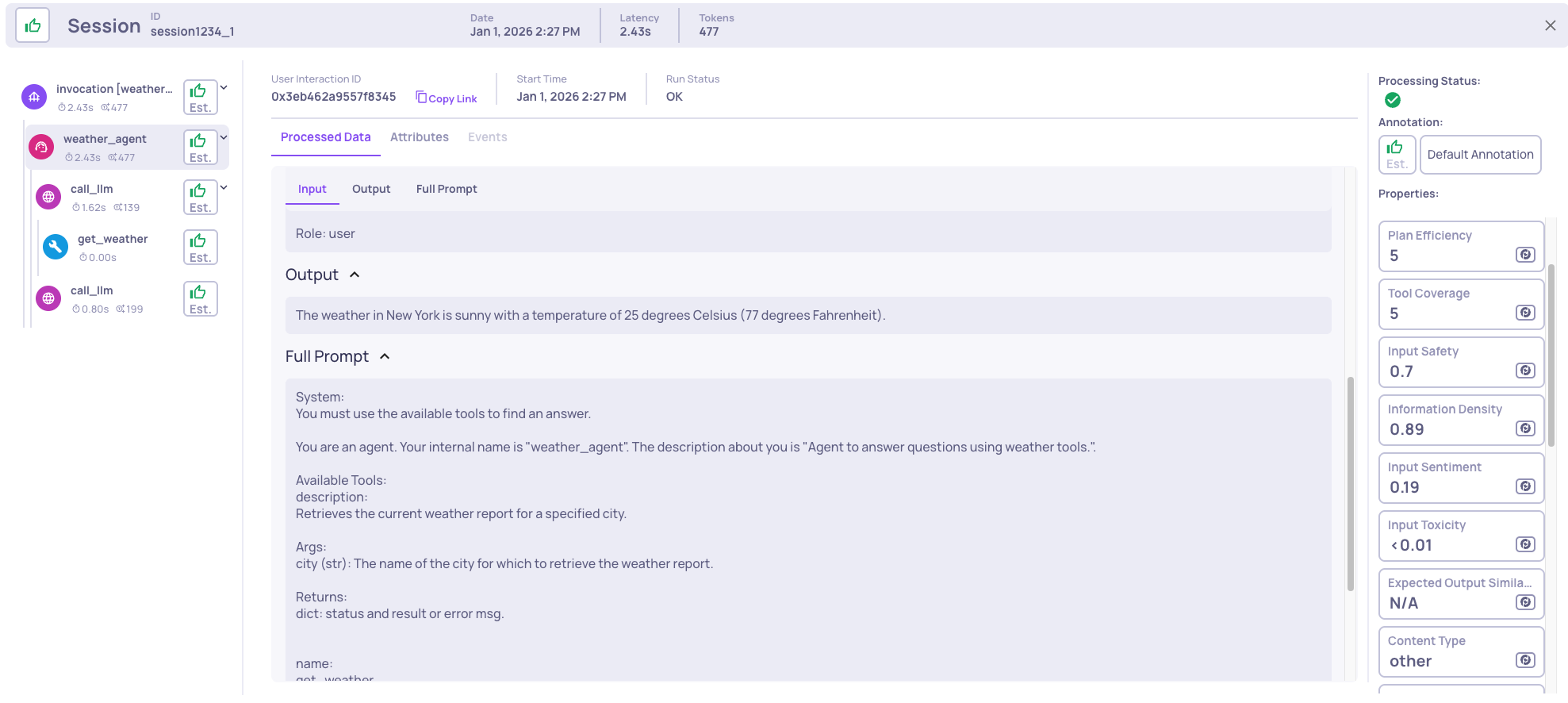
Once uploaded, you’ll see your traces in the Deepchecks UI, complete with spans, properties, and auto-annotations. See here for information about multi-agentic use-case properties.
Package installation
pip install "deepchecks-llm-client[otel]"Instrumenting Google ADK
from deepchecks_llm_client.data_types import EnvType
from deepchecks_llm_client.otel import GoogleAdkIntegration

# Register the Deepchecks exporter
GoogleAdkIntegration().register_dc_exporter(
    host="https://app.llm.deepchecks.com/",   # Deepchecks endpoint
    api_key="Your Deepchecks API Key",        # API key from your Deepchecks workspace
    app_name="Your App Name",                 # Application name in Deepchecks
    version_name="Your Version Name",         # Version name for this run
    env_type=EnvType.EVAL,                    # Environment: EVAL, PROD, etc.
    log_to_console=True,                      # Optional: also log spans to console
)
Best practices for using Google ADK with Deepchecks evaluation
Deepchecks displays whatever span metadata you emit, and you can always define custom properties or map specific span names to interaction types. However, to fully benefit from Deepchecks’ built-in properties-such as clear Agent vs. Tool boundaries, meaningful auto-annotations, and accurate failure-mode clustering-it’s important to follow a few recommended structuring patterns when using Google ADK.
Naming your agent so Deepchecks recognizes it as an Agent interaction
If you want an LLMAgent, CustomAgent, or WorkflowAgent to be mapped to the Agent interaction type, include the word agent in its name. For example, StoryFlowAgent, story_flow_agent, agent_story_flow, etc.
Doing so will automatically map the agent’s span to the Agent interaction type.
Otherwise, the mapping depends on the agent class. For example, WorkflowAgent is mapped by default to the Chain interaction type, since it does not perform planning or decision-making in the same way an LLMAgent does.
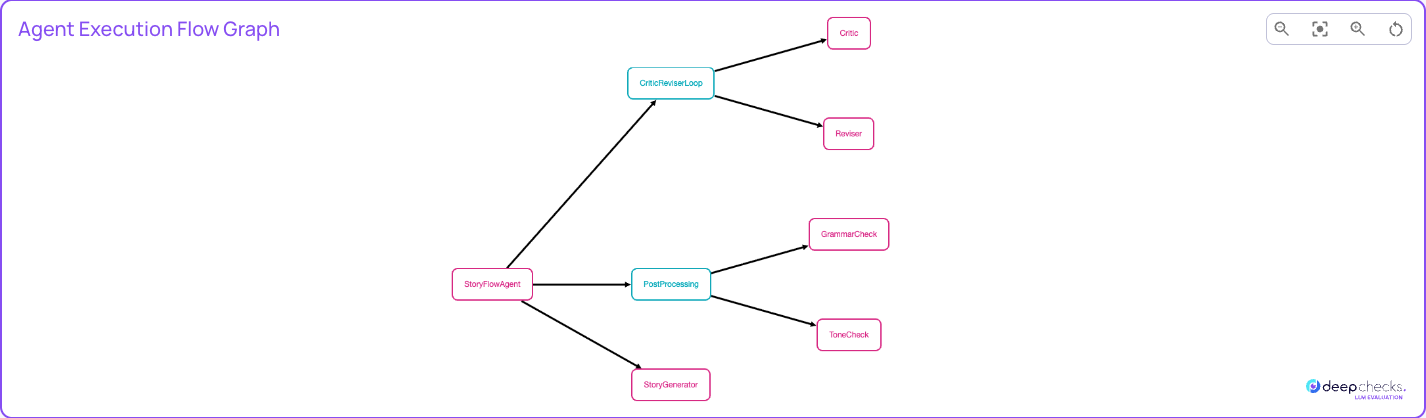
Agent Graph
To understand the often complex flow of an agentic system, Deepchecks displays an Agent Graph. This visualization helps map your application flow and makes it easier to understand what is happening during execution.
To enable this, each span you want to appear in the graph must include the attributes graph.node.id and graph.node.parent_id. These fields allow Deepchecks to correctly build and display the graph structure.
How to add this to your code
Step 1: Add a helper function to annotate the current span
def add_graph_node_attrs_to_current_span(
    node_id: str,
    parent_id: Optional[str] = None,
    display_name: Optional[str] = None,
):
    """
    Attach graph.node.* attributes to the *existing* current span.

    We never create new spans here; we only decorate the span
    that Google ADK / OpenInference has already started.
    """
    span = trace.get_current_span()
    # Defensive check: if there's no active span or it's not recording, do nothing
    if span is None or not span.is_recording():
        return

    span.set_attribute("graph.node.id", node_id)
    if parent_id:
        span.set_attribute("graph.node.parent_id", parent_id)
    span.set_attribute(
        "graph.node.display_name",
        display_name or node_id.replace("_", " ").title(),
    )
Step 2: Wrap each agent so it annotates its span
For example, for an LlmAgent:
class GraphLlmAgent(LlmAgent):
    """
    LlmAgent that annotates its *existing* auto-instrumented span
    as a graph node when it runs.
    """
    parent_node_id: Optional[str] = None

    def __init__(self, parent_node_id: Optional[str] = None, **kwargs):
        super().__init__(**kwargs)
        self.parent_node_id = parent_node_id

    @override
    async def _run_async_impl(
        self, ctx: InvocationContext
    ) -> AsyncGenerator[Event, None]:
        # This runs inside the agent's span created by the instrumentation.
        add_graph_node_attrs_to_current_span(
            node_id=self.name,
            parent_id=self.parent_node_id,
        )
        async for event in super()._run_async_impl(ctx):
            yield event
Step 3: Replace Each Agent Definition with Its Corresponding GraphAgent
Replace every agent you define with its corresponding GraphAgent version. For example, instead of defining an LlmAgent, define a GraphLlmAgent using the same parameters:
main_agent = GraphLlmAgent(
    name="weather_agent",
    model=LLM_TO_USE,
    description="Agent that answers questions using weather tools.",
    instruction="You must use the available tools to find an answer.",
    tools=[get_weather],
)
Example
This example demonstrates how to build a simple Google ADK workflow that uses an LlmAgent with a weather-checking tool. The agent receives a user question about the weather in a specific city, invokes the weather tool to retrieve the result, and returns a final answer to the user. The workflow is executed using the ADK Runner, and all execution traces are exported to Deepchecks for evaluation.
import asyncio
import dotenv
import os
from google.genai import types
from google.adk.agents.llm_agent import LlmAgent
from google.adk.runners import Runner
from google.adk.sessions import InMemorySessionService
from deepchecks_llm_client.data_types import EnvType
from deepchecks_llm_client.otel import GoogleAdkIntegration

dotenv.load_dotenv()

# Can change to any other llm
LLM_TO_USE = "gemini-2.0-flash"

# Register the Deepchecks exporter
tracer_provider = GoogleAdkIntegration().register_dc_exporter(
    host = os.getenv("DEEPCHECKS_HOST"),
    api_key = os.getenv("DEEPCHECKS_API_TOKEN"),
    app_name="APP_NAME", # Need to create the app prior to logging!
    version_name="VERSION_NAME",
    env_type=EnvType.EVAL, # Environment: EVAL, PROD, etc.
    log_to_console=True, # Optional: also log spans to console
)


APP_NAME = "weather_app"
USER_ID = "1234"
SESSION_ID = "session1234"


# Define a tool function
def get_weather(city: str) -> dict:
    """Retrieves the current weather report for a specified city.

    Args:
        city (str): The name of the city for which to retrieve the weather report.

    Returns:
        dict: status and result or error msg.
    """
    if city.lower() == "new york":
        return {
            "status": "success",
            "report": (
                "The weather in New York is sunny with a temperature of 25 degrees"
                " Celsius (77 degrees Fahrenheit)."
            ),
        }
    else:
        return {
            "status": "error",
            "error_message": f"Weather information for '{city}' is not available.",
        }

async def main():
    # Create an agent with tools
    main_agent = LlmAgent(
        name="weather_agent",
        model=LLM_TO_USE,
        description="Agent to answer questions using weather tools.",
        instruction="You must use the available tools to find an answer.",
        tools=[get_weather]
    )

    # Session and Runner
    session_service = InMemorySessionService()
    session = await session_service.create_session(
        app_name=APP_NAME,
        user_id=USER_ID,
        session_id=SESSION_ID
    )
    runner = Runner(agent=main_agent, app_name=APP_NAME, session_service=session_service)

    # Agent Interaction
    content = types.Content(
        role='user',
        parts=[types.Part(text="What is the weather in New York?")]
    )
    events = runner.run(user_id=USER_ID, session_id=SESSION_ID, new_message=content)

    for event in events:
        print(f"\nDEBUG EVENT: {event}\n")
        if event.is_final_response() and event.content:
            final_answer = event.content.parts[0].text.strip()
            print("\n🟢 FINAL ANSWER\n", final_answer, "\n")


if __name__ == "__main__":
    import dotenv
    dotenv.load_dotenv()
    asyncio.run(main())