
AWS CloudWatch Integration
Send Deepchecks evaluation metrics and application logs to your AWS CloudWatch account - for unified monitoring and log aggregation alongside your other AWS services.
Deepchecks running in AWS SageMaker can stream two kinds of data into your AWS CloudWatch account:
- Metrics - evaluation metrics and monitoring data, so you can build CloudWatch dashboards and alarms alongside your other AWS telemetry.
- Logs - Deepchecks application logs, so you can consolidate backend logs with the rest of your AWS log aggregation and retention policies.
Both integrations are independent - enable one, the other, or both. Each is toggled from Workspace Settings / Preference (OWNER role only).
Due to a limitation of AWS SageMaker, CloudWatch data can only be sent to the same AWS region where the Deepchecks Partner AI App is deployed.
CloudWatch Metrics
Send Deepchecks monitoring and evaluation metrics to CloudWatch for unified dashboards and alarms.
IAM permissions
Add the following policy to the execution role you deployed Deepchecks with (called PartnerAiAppExecutionRole in the AWS documentation):
{
    "Version": "2012-10-17",
    "Statement": [
        {
            "Sid": "AllowSendCloudWatchMetrics",
            "Effect": "Allow",
            "Action": "cloudwatch:PutMetricData",
            "Resource": "*",
            "Condition": {
                "StringEquals": {
                    "cloudwatch:namespace": "DeepChecksLLM"
                }
            }
        }
    ]
}
Enable the feature
This is only accessible to users with the
OWNERrole.
- Navigate to Workspace Settings / Preference
- Under Application Settings / Category, select
CLOUDWATCH_SYSTEM_CONFIG
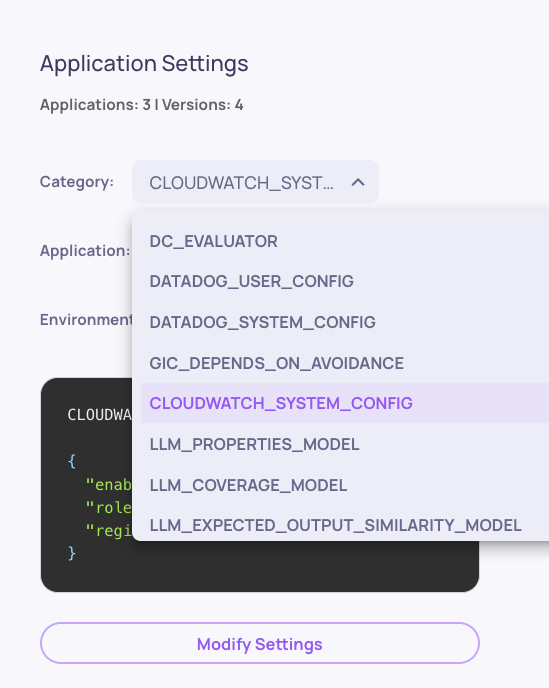
- Set
enabledtotrue
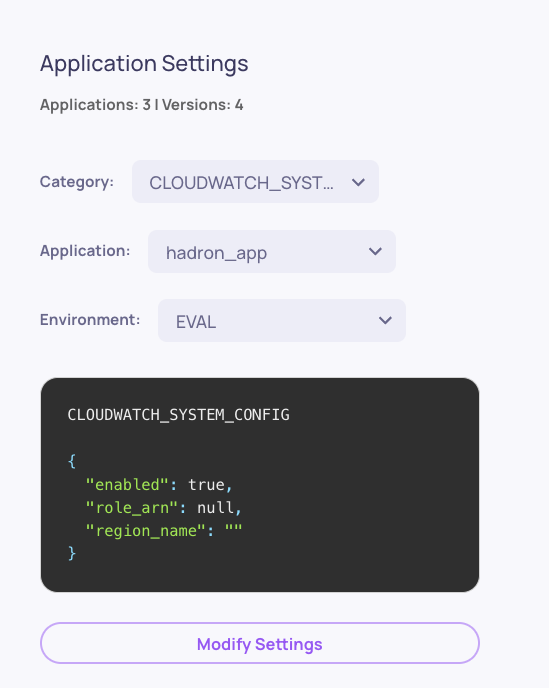
Leave
role_arnandregion_nameas is.
CloudWatch Logs
Stream Deepchecks application logs to CloudWatch so they live alongside the rest of your AWS logs, with retention policies you control.
IAM permissions
Add the following policy to the same PartnerAiAppExecutionRole execution role so Deepchecks can create log groups and publish log events:
{
    "Version": "2012-10-17",
    "Statement": [
        {
            "Sid": "AllowSendCloudWatchLogs",
            "Effect": "Allow",
            "Action": [
                "logs:CreateLogGroup",
                "logs:CreateLogStream",
                "logs:PutLogEvents",
                "logs:DescribeLogStreams",
                "logs:PutRetentionPolicy"
            ],
            "Resource": "*"
        }
    ]
}
Log groups are created under the /deepchecks prefix.
Enable the feature
This is only accessible to users with the
OWNERrole.
- Navigate to Workspace Settings / Preference
- Under Application Settings / Category, select
CLOUDWATCH_LOGS_CONFIG - Configure the settings:
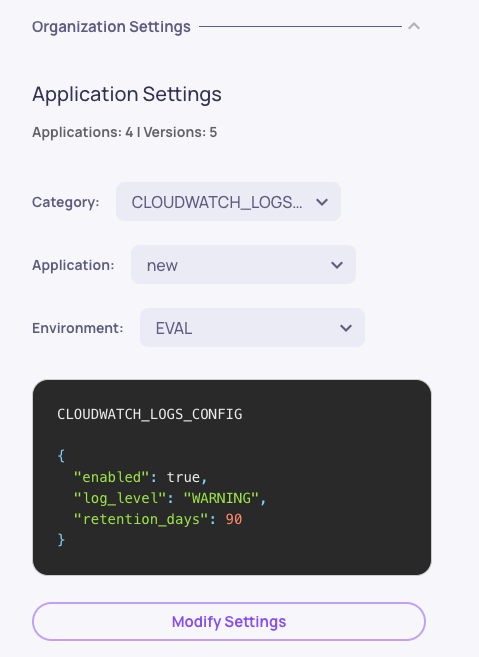
| Field | Description |
|---|---|
enabled | Set to true to start streaming logs to CloudWatch. |
log_level | Minimum level to forward: DEBUG, INFO, WARNING, ERROR, or CRITICAL. Defaults to WARNING. |
retention_days | How long CloudWatch should retain the log group. Defaults to 90. |
Changes take effect within ~15 minutes - the Deepchecks backend polls the configuration on a cached interval rather than reacting instantly.