
Root Cause Analysis
By this point we have a clear picture from two directions:
- Quality: the Agent interaction type (specifically the web-search agent) is scoring much lower than the Tool it wraps. The tool works; the agent using it doesn't.
- Operations: the same sub-agent accounts for outsized latency and token cost.
Root Cause Analysis turns that picture into specific, clustered failure categories - with concrete examples - so we know what to fix.
Analyzing Property Failures
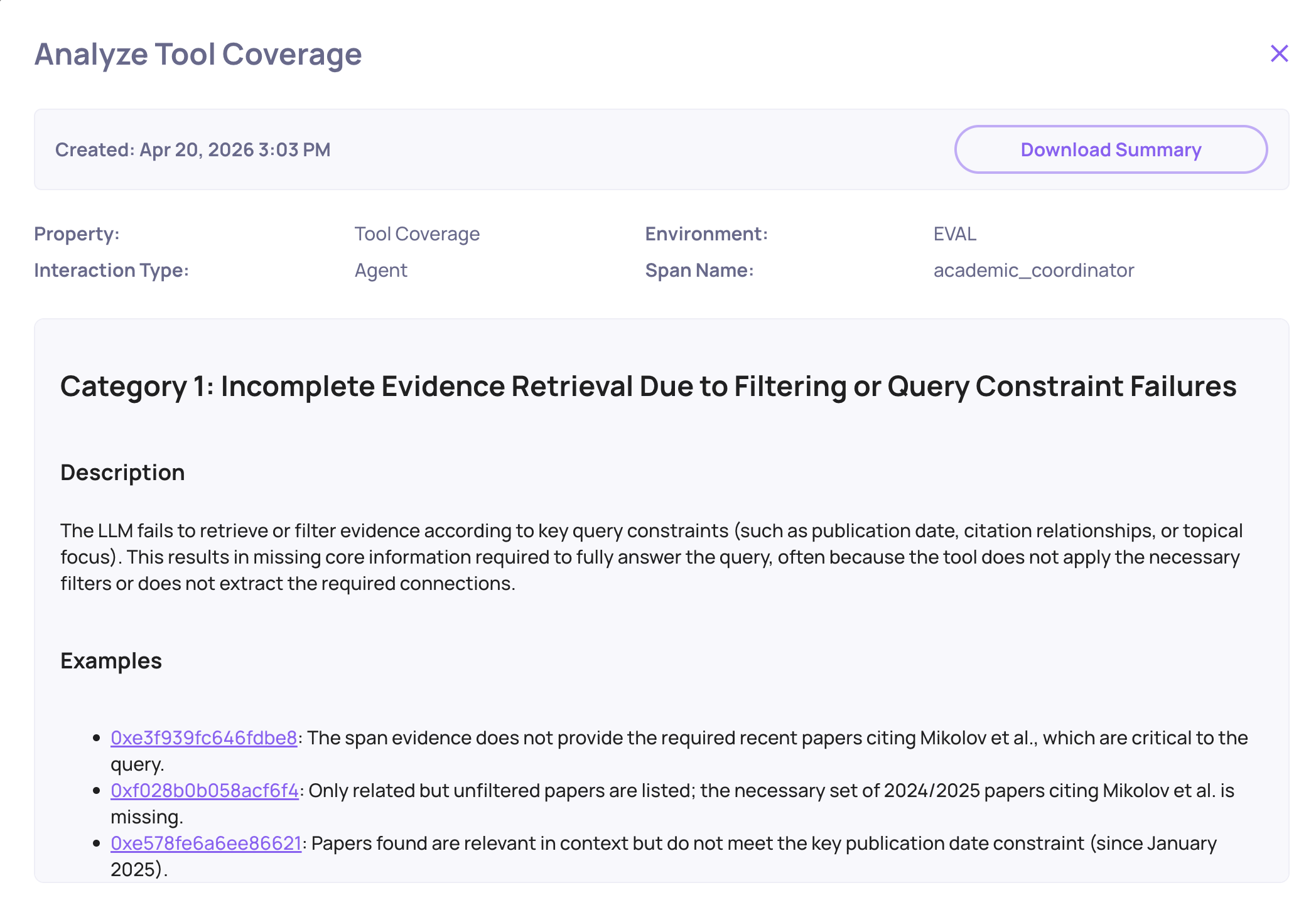
From the Overview, select the Agent interaction type and generate a failure mode analysis for the failing property by clicking on the magnifying glass icon on the property - for this app, Tool Coverage is the one to focus on first. Deepchecks automatically groups the failing traces into failure categories, each with a short label, a frequency, and example traces.
For the Academic Researcher, the automated failure analysis surfaced two dominant categories:
1. Incomplete retrieval
"Agent issued a single broad query and stopped."
The web-search agent formulated one query, got results that were only partially relevant, and produced its summary directly from those results - never iterating, never refining the query based on what it saw. A human researcher, or a well-prompted agent, would have done a follow-up search. This one didn't.
2. Dropped context on handoff
"Coordinator passed title only, losing the user's angle."
When the coordinator delegated to the web-search agent, it compressed the user's request into just the paper's title - stripping the specific research angle the user had mentioned ("find papers that improve on the efficiency of the attention mechanism", for example). The sub-agent then retrieved generic citing papers instead of ones relevant to the user's angle.
How the Categories Are Generated
Deepchecks runs the automated failure categorization in roughly 15 seconds across hundreds of traces. It clusters by the underlying behavior - not just by error message - so you get categories like "issued a single broad query" rather than "output differed from expected". Each category lists concrete example traces you can click into to verify the pattern.
This is what turns the raw score from the previous step into something actionable. "Agent score is 24%" does not tell you what to fix. "33% of failures are dropped-context-on-handoff" does.
Trace-Level Drill-Down
Picking any example from a failure category opens the Single Session View - the full parent/child hierarchy. Here you can see, for that specific conversation:
- The user's original turn (including the angle the coordinator later dropped).
- The coordinator's LLM call and the prompt it actually sent to the sub-agent.
- The sub-agent's own LLM call and the query it passed to the web-search tool.
- The tool's results.
- The synthesis step, if any.
Reading the chain for one concrete failure is usually enough to confirm the hypothesis from the failure category.
From Hypothesis to Fix
The two failure categories map directly to two distinct fixes:
| Failure category | Fix |
|---|---|
| Incomplete retrieval | Update the web-search agent's prompt to require iterative querying - re-search if the first results don't cover the user's angle, and stop only when coverage is sufficient. |
| Dropped context on handoff | Update the coordinator's prompt to pass the full user intent (paper + angle + constraints) when delegating, not just the paper title. |
Both fixes are prompt-level, not architectural. Most agent failures show up between components rather than inside them, and Deepchecks is what makes those handoffs visible.
Closing the Loop
Once a fix is in, log the new run as a new version of the same app, re-run the dataset, and compare versions side-by-side on Overview. The Agent interaction type score is the one to watch - if the hypotheses were right, it moves up sharply without Tool or LLM scores changing much.
Key Takeaways
- A single overall score tells you something is wrong, not where.
- Evaluating by interaction type (Agent / LLM / Tool / Root) is what isolates which components are broken.
- Multi-turn evaluation surfaces conversation-level failures that no individual span could reveal.
- System metrics catch operational failures (stuck runs, zero-token calls, runaway cost) that quality evaluation alone will miss.
- Automated failure categorization turns "agent scored low" into specific, actionable patterns in ~15 seconds.
- Google ADK auto-instrumentation is the enabler - none of the above requires manual span plumbing. A single
register_dc_exportercall gives you the whole picture.
For the longer write-up behind this example, see: Your AI Agent Is Failing - You Just Can't See Where.
Updated 3 months ago